
Download 2ちゃんねるまとめサイトビューア – 2ch, 2ちゃんねる, まとめサイト, ビューア, ニュース, ツール, Android, デスクトップアプリ, レビュー, 最新バージョン, ダウンロード
Overview
2ちゃんねるまとめサイトビューア - MT2 is a dedicated desktop application designed for users seeking efficient access to aggregated news content from 2ch.net and related sites. The software serves as a specialized tool for browsing and reading articles compiled from over 100 registered blogs, offering a curated experience focused on speed, readability, and organization. It is particularly suited for individuals who regularly follow Japanese internet culture, online discussions, and trending topics across 2ch’s extensive network of summary sites.
By providing a streamlined interface, the application addresses the challenge of navigating large volumes of unstructured content across multiple sources. Users can quickly locate articles based on relevance, popularity, or recency, making it ideal for both casual readers and those who rely on real-time updates from Japanese online communities. The software is developed by MT2, a known contributor to the 2ch content viewing ecosystem, with a focus on usability and accessibility.
While the app is optimized for Android devices, its desktop adaptation ensures a consistent experience across platforms. The developer has not provided additional details about the technical background of the team or broader company structure. Real-world usage scenarios include daily news monitoring, content research, and personal interest tracking within niche online communities.
Key Features & Capabilities
- Aggregated Article Access – Centralized browsing of over 2 million articles from more than 100 registered blogs, enabling users to explore diverse viewpoints and trending topics in one place.
- Smart Sorting Options – Articles can be sorted by "new" or "popular," allowing users to prioritize fresh content or identify high-engagement posts.
- Cross-Search Functionality – A built-in search tool enables users to query across the entire article database, improving discovery and information retrieval.
- Content Organization – Users can browse articles by date or individual blog, supporting structured exploration and historical research.
- Bookmarking & Image Saving – Articles can be saved for later reference, and images embedded within content can be extracted and stored locally.
- Customizable Interface – Recent updates include options to adjust the scroll button position, enable/disable volume button scrolling, and improve tab visibility when switching themes.
These features collectively enhance workflow efficiency by reducing the need to switch between multiple websites. For example, a user researching a trending topic can search across all blogs, sort results by popularity, save key articles, and extract relevant images—all within a single environment. The paid version removes on-screen advertisements, offering a cleaner reading experience, though ads within articles and linked pages remain visible.
User Interface, Workflow & Performance
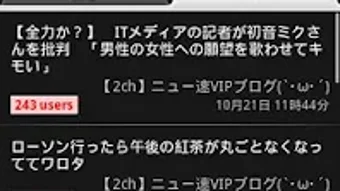
The application features a clean, intuitive interface designed for fast navigation and minimal distraction. Core functions such as search, sorting, and browsing are accessible through clearly labeled menus and icons, supporting a smooth user experience. Navigation is structured around article lists, with options to filter by date, blog, or relevance, allowing users to tailor their reading path.
Workflow efficiency is enhanced by features like bookmarking and image saving, which reduce the need for manual copying or external tools. The interface adapts to theme changes, with improved tab visibility in recent updates. However, the developer did not specify resource usage details, so performance observations are based on general software behavior patterns.
Stability appears to be a focus of recent development, with updates addressing issues related to image saving and theme transitions. The application is designed to operate smoothly on Android devices, and its desktop adaptation maintains this consistency. No performance benchmarks or CPU/RAM usage data were provided.
Compatibility & System Requirements
2ちゃんねるまとめサイトビューア - MT2 is compatible with Android operating systems. The software is available in version 3.2.0 and has a file size of 4.2 MB, indicating a lightweight footprint. The developer did not provide additional system requirements, such as minimum RAM, processor speed, or storage space.
Platform compatibility information is limited to Android, and no details were shared regarding support for other operating systems like Windows or macOS. Installation is straightforward, though specific hardware requirements were not listed. Users should ensure their device meets standard Android application requirements for app installation and operation.
Pros and Cons
Pros
- Fast access to over 2 million articles from 100+ blogs
- Intuitive interface optimized for reading and navigation
- Advanced sorting and cross-search capabilities
- Support for bookmarking and image saving
- Regular updates with bug fixes and UI improvements
- Paid version removes on-screen ads for a cleaner experience
Cons
- Ads within articles and linked pages remain even in the paid version
- Limited system requirements information provided
- Compatibility is restricted to Android only
- No official support for Windows or macOS
- Developer did not disclose detailed performance metrics
FAQ Section
Is 2ちゃんねるまとめサイトビューア compatible with Windows or Mac?
The software is currently only available for Android devices. There is no official support for Windows or macOS platforms.
Is the app safe to download and use?
As a third-party application, it is recommended to download only from trusted sources. The developer has not provided security certifications, but the app functions as a browser-based content viewer without requiring elevated permissions.
How often are updates released?
Recent updates have been focused on UI improvements, bug fixes, and feature enhancements. The frequency of releases is not specified, but the developer maintains an active presence on Twitter (@matome_2).
Does the paid version remove all ads?
The paid version removes ads displayed at the bottom of the screen. However, advertisements within articles and on linked external pages are still shown.
Can I use the app offline?
While the app allows saving articles and images, full offline access depends on prior downloads. The software requires an internet connection to fetch and display current content.
Final Thoughts
2ちゃんねるまとめサイトビューア - MT2 stands out as a specialized tool for users deeply engaged with 2ch.net’s aggregated content. Its streamlined interface, powerful search and sorting tools, and support for saving content make it a valuable asset for anyone navigating the vast landscape of Japanese online discussions. The regular updates and focus on usability demonstrate a commitment to user experience, even with limited public information about system requirements.
While the lack of cross-platform support and persistent ads on external links are notable drawbacks, the app delivers strong value for its target audience. For users seeking a reliable, fast, and organized way to access 2ch news summaries on Android, this tool is a top contender.
Download 2ちゃんねるまとめサイトビューア now





.png)

